
1/2 inch graph paper (large squares)
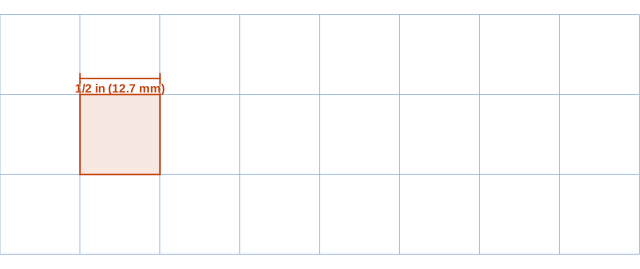
Half-inch graph paper has two large squares per inch. Children who are learning to write numbers fit one digit comfortably in each square, and the grid is easy to see for anyone with low vision.
Print at 100% / Actual size so the squares measure exactly. Printing help
What it looks like up close
Ready-made PDF downloads
Prefer a file you can save and print later? These use the default settings shown above.
How many squares per page
Each square is 0.5 in (12.7 mm). With the default margin, a sheet holds:
| Paper | Portrait (across × down) | Landscape (across × down) |
|---|---|---|
| US Letter | 16 × 21 | 21 × 16 |
| A4 | 15 × 22 | 22 × 15 |
| US Legal | 16 × 27 | 27 × 16 |
| Tabloid 11×17 | 21 × 33 | 33 × 21 |
| A3 | 22 × 32 | 32 × 22 |
Example: column addition
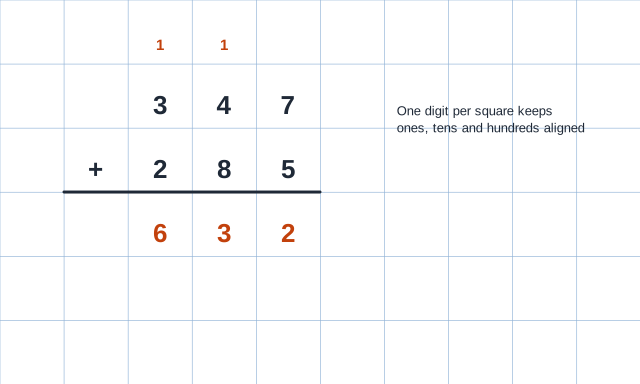
Writing one digit per square makes regrouping visible: the carried ones sit directly above the column they belong to. Children can check their answer by reading the columns from right to left—ones, tens, hundreds—without digits drifting out of line.
Large-square paper in the classroom
Teachers use half-inch grids for column addition and subtraction, place value, early multiplication and simple bar charts. Each digit gets its own square, so ones, tens and hundreds line up without effort.
Occupational therapists recommend it for students whose handwriting is large or who struggle with spatial organization. It is also good for making flashcards, simple mazes and game boards.
Other uses
Larger squares work as a guide under thin paper for lettering or calligraphy practice, and as a quick layout grid for bulletin boards. A Letter sheet holds 16 × 21 squares.
For even larger squares see 1 inch graph paper; for the usual school grid see 1/4 inch.
Making activities with large squares
Half-inch squares are large enough to color in, so the sheet doubles as pixel-art and symmetry paper: draw a line down the middle and ask students to mirror a shape square by square. It also works for simple multiplication arrays—3 rows of 4 squares shows 3 × 4 = 12 at a glance—and for introducing area before formulas.
For handwriting practice, have children write one letter per square to keep spacing even. Print a few pages in light gray and they become a reusable template under tracing paper.
How to use large-square paper for math
- Write the first number with one digit per square, lined up on the right.
- Write the second number directly underneath, again right-aligned.
- Draw a line along the grid under both numbers.
- Add each column from the right, writing carried digits small in the square above the next column.
- Check by adding in the opposite order or by estimating.
Games and crafts on half-inch grids
Half-inch squares are the right size for paper versions of dots and boxes, battleship and simple board games. Kids can draw pixel pictures with markers, and teachers can cut sheets into 10 × 10 squares to make hundred charts or fraction strips.
Compare with nearby sizes
Squares per page with 1/4 inch margins, portrait. All sizes are compared on the home page.
| Grid | Square (in) | Square (mm) | US Letter | A4 |
|---|---|---|---|---|
| 1/4 inch | 0.25 | 6.35 | 32 × 42 | 31 × 44 |
| 1 cm | 0.394 | 10 | 20 × 26 | 19 × 28 |
| 1/2 inch | 0.5 | 12.7 | 16 × 21 | 15 × 22 |
| 1 inch | 1 | 25.4 | 8 × 10 | 7 × 11 |
Questions
What grade uses 1/2 inch graph paper?
Mostly kindergarten through 2nd or 3rd grade, and older students who need extra room for each digit.
How many squares are on a page?
16 across and 21 down on US Letter with 1/4 inch margins; 15 × 22 on A4.
Can I make the lines darker?
Yes—pick a darker color or a higher line weight in the generator before downloading.
Is there a metric version?
1 cm graph paper is the closest metric equivalent; 1/2 inch is 1.27 cm.
Can I add a header for the student's name?
Use the 1/4 inch or engineering page settings with “Name / Date header”, then change the square size to 0.5 inch.