
Engineering paper (computation pad)
Engineering computation paper is the light-green pad used in engineering school: a 5-squares-per-inch grid, a header for your name and date, and a clean layout for hand calculations and sketches.
Print at 100% / Actual size so the squares measure exactly. Printing help
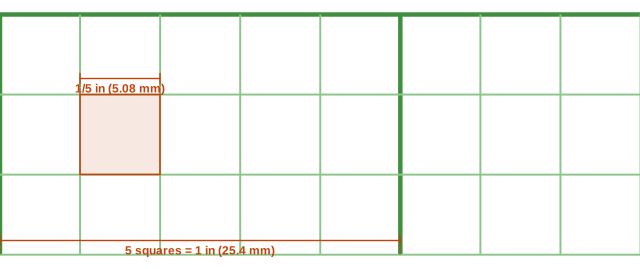
What it looks like up close
Ready-made PDF downloads
Prefer a file you can save and print later? These use the default settings shown above.
How many squares per page
Each square is 0.2 in (5.08 mm). With the default margin, a sheet holds:
| Paper | Portrait (across × down) | Landscape (across × down) |
|---|---|---|
| US Letter | 37 × 50 | 50 × 37 |
| A4 | 36 × 53 | 53 × 36 |
| US Legal | 37 × 65 | 65 × 37 |
| Tabloid 11×17 | 50 × 80 | 80 × 50 |
| A3 | 53 × 77 | 77 × 53 |
Example: a worked statics problem
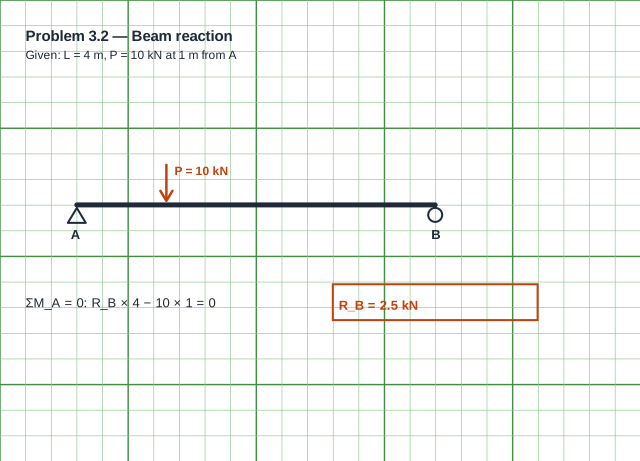
The sketch is drawn to a rough scale on the grid, the given values are listed at the top, and the solution proceeds one line at a time: taking moments about A gives R_B × 4 = 10 × 1, so R_B = 2.5 kN. Boxing the answer and writing the units is standard practice in engineering courses.
How engineers use it
Homework and design calculations are written one step per line, with sketches drawn to scale on the grid. The green tint reduces glare and makes pencil easy to read; on the classic pad the grid is printed on the back so it shows faintly through the sheet.
Write the problem statement at the top, list given values and assumptions, draw a free-body diagram, then work down the page with units on every line and box the final answer.
Grid and header
The grid is 0.2 inch (five squares per inch) with a bold line every inch, the same as 5×5 graph paper. Untick “Name / Date header” for a plain grid, or change the color to blue or gray.
Setting up a page of calculations
Start every sheet with the problem number and a short statement of what is being solved. Number the pages as “1 of 3” so a multi-page solution stays in order, and keep a margin on the left for references to equations or code clauses.
Use the grid for neat sketches: one square can be one unit or a convenient scale, and the bold inch lines give quick reference lengths. Draw the final answer in a box with units, so a reviewer can find it immediately.
How to lay out an engineering solution
- Fill in the header: name, date, course and page number.
- State the problem and list the given values with units.
- Draw a clear sketch or free-body diagram using the grid.
- Write equations one per line, substituting numbers with units.
- Box the final answer and check it for reasonableness.
Engineering paper versus regular graph paper
Regular graph paper is designed for drawing on the grid; engineering paper is designed for writing calculations with occasional sketches. That is why the grid is light, the header is prominent and the margins are wider. Printing the PDF in a pale green on white paper comes close to the feel of a real computation pad.
Recommended settings
Starting points for common uses. Pick the closest one, then adjust the size or color in the generator above.
| Use | Settings |
|---|---|
| Engineering homework | Letter, 5 per inch, header on, green |
| Lab notebook pages | Letter, 5 per inch, header on, gray |
| Metric version | A4, 5 mm squares, header on |
Questions
Why is engineering paper green?
Light green is easy on the eyes and contrasts well with pencil. It is a tradition rather than a rule—any color works.
Is the grid on the front or the back?
On real pads the grid is printed on the back. A printed PDF puts it on the front; print it lightly and it serves the same purpose.
What size is the grid?
Five squares per inch (0.2 inch squares) with one-inch bold lines.
Can I print engineering paper on A4?
Yes—choose A4; the grid stays at five squares per inch.
Can I change the header text?
The header shows Name and Date fields. Turn it off for a plain grid.