
A4 graph paper
A4 is the paper size used everywhere outside North America: 210 × 297 mm. This generator builds graph paper sized exactly for A4, so the grid is centered and no squares are cut off at the edges.
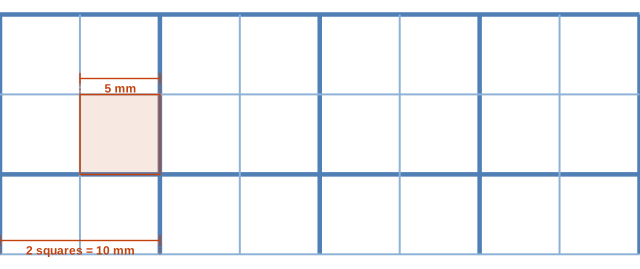
What it looks like up close
Ready-made PDF downloads
Prefer a file you can save and print later? These use the default settings shown above.
How many squares per page
Each square is 0.1969 in (5 mm). With the default margin, a sheet holds:
| Paper | Portrait (across × down) | Landscape (across × down) |
|---|---|---|
| US Letter | 40 × 53 | 53 × 40 |
| A4 | 39 × 56 | 56 × 39 |
| US Legal | 40 × 68 | 68 × 40 |
| Tabloid 11×17 | 53 × 83 | 83 × 53 |
| A3 | 56 × 81 | 81 × 56 |
A4 compared with US Letter
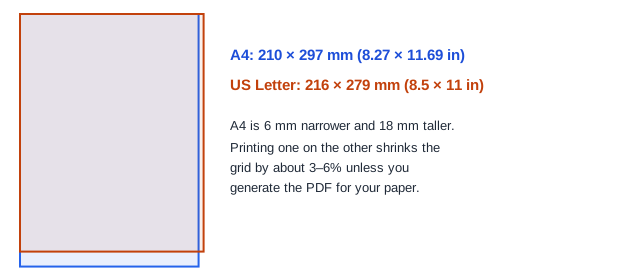
A4 is narrower and taller than Letter. That small difference is why a PDF made for one size is slightly shrunk when printed on the other: the printer scales the page to fit the shorter side. Generating the graph paper for the exact size in your printer avoids the problem entirely.
Choosing a grid for A4
5 mm squares are the classic school grid, 1 cm squares suit young students and scale drawings, and 2 mm or 1 mm squares are for science and engineering graphs. The table below lists how many squares each size fits on an A4 page.
Use the generator to switch between portrait and landscape; landscape gives more squares along the horizontal axis for time-series graphs.
Printing A4 on a Letter printer
If your printer only has US Letter paper, choose US Letter in the generator instead of printing an A4 PDF. An A4 PDF printed on Letter paper is usually shrunk by about 6%, and the squares are then no longer 5 mm.
Related sizes: 5 mm, 1 cm, 2 mm and 1 mm.
Margins and bold lines on A4
The default margin is 7 mm, inside the non-printable border of nearly every printer, so nothing is clipped or shrunk. If you plan to punch holes for a ring binder, set the margin to 15 mm and switch to landscape only if the binder opens on the short side.
Bold lines help when you draw graphs. On 5 mm paper a bold line every 2 squares outlines each centimeter; on 2 mm paper every 5 squares does the same. For plain notebook-style paper set the bold interval to 0.
How to print A4 graph paper
- Choose the grid you need with the buttons above the preview.
- Check that the page size says A4 and pick portrait or landscape.
- Download the PDF or open it to print.
- In the print dialog, select A4 paper and Actual size / 100%.
- Measure ten squares to confirm the size.
Other ISO paper sizes
A3 (297 × 420 mm) is two A4 sheets side by side and is useful for large graphs and wall charts. A5 (148 × 210 mm) is half of A4 and fits small notebooks and planners. All A sizes share the same 1 : √2 proportions, so a grid designed for one scales cleanly to another on a copier—though the square size then changes.
Compare with nearby sizes
Squares per page with 1/4 inch margins, portrait. All sizes are compared on the home page.
| Grid | Square (in) | Square (mm) | US Letter | A4 |
|---|---|---|---|---|
| 1 mm | 0.039 | 1 | 203 × 266 | 197 × 284 |
| 2 mm | 0.079 | 2 | 101 × 133 | 98 × 142 |
| 5 mm | 0.197 | 5 | 40 × 53 | 39 × 56 |
| 1 cm | 0.394 | 10 | 20 × 26 | 19 × 28 |
Questions
What are the dimensions of A4?
210 × 297 mm, or about 8.27 × 11.69 inches.
Can I make A3 graph paper?
Yes, choose A3 as the paper size in the generator.
Is the PDF free to use for my class?
Yes. Print as many copies as you need for personal or classroom use.
Does the generator support A3 and A5?
Yes, both are in the page size list.
Why is my A4 grid off-center when printed?
Some printers have uneven margins. The grid in the PDF is centered; the shift comes from the printer's paper feed.